iLoader for Facebook HD 2.1.0
The Best Facebook photo and video batch uploader and viewer just got Revolutionized! iLoader HD takes the tedious uploading process and makes it fun and easier than ever! iLoader HD makes viewing your and your friends’ photos and videos fun and totally addicting. Don’t take our word for it - check out the screenshots and reviews to decide for yourself!
★★★ Uploading Features:
✓ Super fast multi-photo selection
✓ Add captions and tag friends in photos
✓ Rotate, crop or flip photo
✓ Adjust photo brightness, contrast, saturation, color, sharpen or blur
✓ Fix redeye, blemish, whiten teeth in photo
✓ Make your photo interesting by adding text, Meme or draw on it
✓ Create cool photo effects with 10 build-in filters including vintage, simplify, indiglow, day dream, etc...
✓ Swipe & Pinch photos to view in more detail, similar to built-in Photos app
✓ Create new photo albums and set privacy from within iLoader
✓ Upload photos to personal albums or Fan Pages
✓ Add video titles, descriptions and set privacy/permissions
✓ Trim and playback videos to make sure they are perfect before uploading
✓ Upload regular or HD versions of photos and videos
✓ Continue uploading even after you exit iLoader, with multi-task/background support
✓ Batch upload multiple selected photos and videos to Facebook in one shot
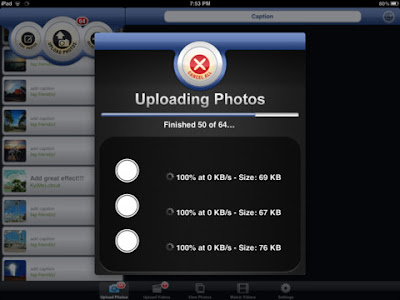
✓ Show progress when uploading with pause and resume
★★★ Viewing and Other Features:
✓ View your personal photos and photos of your Fan Pages
✓ View photos as a slideshow
✓ Watch videos (standard or HD quality) from you, friends, pages and groups
✓ Share videos to Facebook, Twitter and Email
✓ Quickly update your Facebook status
✓ NO INTERNET CONNECTION? NO PROBLEM. iLoader can do everything except upload without an Internet connection
✓ Save selections and edits and later resume where you left off
✓ Work on 3G or Wifi
★★★ Feedback:
Please contact us if you have any problems. We also appreciate suggestions. Email us at: support@tektrify.com
★★★ NOTE
✓ Location Services need to be enabled, otherwise iLoader HD is unable to access your Photo-Library. iLoader HD does not determine your current location nor save or transmit it.
✓ iLoader will work on all iPhones and iPod Touches with 4.0 or later and require a Facebook account.
✓ iLoader uses the Facebook APIs but Facebook does not endorse nor sponsor iLoader, nor is Tektrify, Inc affiliated in any way with Facebook.
What's new in Version 2.1.0
Version 2.1.0
- Update photo effects
- Improve uploading speed and stability
- Upload 2 video at a time now
Fixes:
- Fix crashes on iPad 1 when uploading
- Fix random crashes when tagging
Download:
http://www.filedude.com/download/KRTlbl98qT30e07b2ffc
Scan To PDF 1.0.3 Turn your iOS device into a document scanner!FEATURED IN THE NEW & NOTEWORTHY SECTION BY APPLE!Scan To PDF allows you to obtain images of documents from your camera or image library and convert them into great looking multi-page PDF files. The app includes a proprietary image processing algorithm that converts the color images taken from the camera into great looking black and white images. Once the PDFs are generated, you can export them via email, printer, or to any other app that accepts PDFs. In fact, printing the PDFs essentially turns the app into a copy machine. Scan to PDF includes many image processing tools such as rotation, crop, copy to clipboard, grayscale, and others.If you have an efax service, Scan To PDF is a great way of inputing documents for faxing.You can export images to the clipboard or image library for use in other apps.Watch the demo video on our website at www.tipirnenisoftware.com.Features:- proprietary image processing algorithm for great looking documents.- import from camera, clipboard, or image library.- export PDFs via email, printer, DropBox, or to any other app that accepts PDFs.- export individual images via clipboard or image library.- magnified view to see full image detail.- universal app for iPad, iPhone, and iPod Touch.PLEASE NOTE: This app has limited functionality on devices without a camera such as the first generation of iPads. On these devices images can only be imported from the clipboard or image library.What's new in Version 1.0.3Fixed a bug that would cause a crash when selecting a document on the iPad. Download:http://www.filedude.com/download/FhO5iIR1YHfa1263deb5

TuneIn Radio Pro 2.3
TuneIn is a new way to listen to the world through live local and global radio from wherever you are. Whether you want music, sports, news or current events, TuneIn offers over 50,000 stations and 120,000 shows for you to choose from. The TuneIn Radio Pro app for iPhone, iPad and iPod touch puts this entire experience in the palm of your hand with the added benefit of recording what you’re listening to.With TuneIn, it’s easy to find your favorite hometown station, music from Berlin that reminds you of when you lived there, or reggae from Kingston to get you in the mood for your beach vacation. TuneIn makes you feel like you are right there with the people and places that are important to you. From finding what’s local to discovering new stations from around the world, TuneIn brings you to where you want to be.With TuneIn Radio Pro, you can:• Record, pause and rewind any station as you are listening• Set timed recordings for your favorite morning talk show so you can listen on your way to work• Pause live streams for up to 30 minutes with the ability to rewind and listen again as much as you like• Add the stations, songs and shows you love most to your presets• Shake your phone to hear new stations based on what you already like• Share a station, show or song with your friends on Facebook or Twitter• Wake up every day using the alarm clock and fall asleep every night using the sleep timer• Play your stations in the background while you use other apps• Stream your stations to an AirPlay-compatible receiver (requires iOS 4.2)Learn more or listen online at http://www.tunein.comLike us on Facebook at http://www.facebook.com/tunein.radioFollow us on Twitter at http://www.twitter.com/tuneinNeed help? Visit http://www.tunein.com/supportThis software uses code of FFmpeg (ffmpeg.org) and LibMMS (launchpad.net/libmms) licensed under the LGPLv2.1 (www.gnu.org/licenses/old-licenses/lgpl-2.1.html) and their source can be downloaded at tunein.com/mobile/ios.What's new in Version 2.3• We’ve added current and archived popular shows and stations like WBEN News Radio’s events and speeches from the likes of Barack Obama, Syracuse Basketball Coach Jim Boeheim, Patriots QB Tom Brady and coach Bill Bellichek, The Whiner Line from "The Big Show" on Boston’s WEEI Sports Radio; and interviews from KISS 98.5 in Buffalo, NY (Buffalo Bills QB Ryan Fitzpatrick, DMC of Run DMC, Justin Bua and Kermit The Frog all visited last month).• We've made it quicker to access News - it's now available on the first Browse screen along with Music, Sports and Talk.• We made improvements to artist search and “Now Playing” song information.• We fixed an issue with the remote control not working on iOS 5 when using a dock.• Additional bug fixes.• NOTE: On iOS 5, the screen must be left unlocked for the alarm/record timer to work (this is an iOS5 issue). Consider using the in-app clock display to set the screen brightness. Download:DOWNLOAD Link 1
or
DOWNLOAD Link 2
Manga Browser, Downloader & Reader 1.7 WANT TO READ 8000 MANGAS ????"Manga Browser, Downloader & Reader" allows you browse, download and read all mangas from some most popular manga sites: "MangaFox.com", "MangaEden.com", "MangaReader.net", (~8000 mangas) .Some of them are:- Beelzebub- Historys Strongest Disciple Kenichi- Fairy Tail- The Breaker- Air Gear- The World God Only Knows- Noblesse- Hajime No Ippo- Tenjou Tenge- 1/2 Prince- Code Breaker- Liar Game- Change 123- Deadman Wonderland- Veritas- Defense Devil...Features of "Manga Browser, Downloader & Reader":BROWSING"Manga Browser, Downloader & Reader" allows you browse mangafox.com directly with built-in Web Browser.After find your favorite mangas, you can add them to "Reading List" for downloading and reading them.READINGRead your favorite mangas with the most convenient manga viewer:- Read in Portrait/Landscape mode.- Zooming with pinch and pan.- Double touches to zoom quickly.- Lock rotation for reading in bed.- "Go to page" function allows you go to any pages quickly.- Reading and Downloading at the same time.- Download all chapters feature (three chapters at the same time and auto download next chapters).- Next, Back Chapter buttons.- Option to tap to side of Reader to turn page.ORGANISING- "Reading Manga" List allows you organize your reading mangas more effectively.- "Last Read" List allows you quick access to last chapters which you read before.UPDATE NEW CHAPTER- Update new chapter for any series manually.CRASH: Try enable "Not load Browser at startup" option.UNIVERSAL APP SUPPORT IPOD/IPHONE AND IPADWhat's new in Version 1.7- Support "Update All" manga.- Support search Reading manga.- Fix some bugs. Download:http://fileape.com/dl/RoAACNCoYQJht5yXhttp://www.filedude.com/download/BZS6isjaZkeadc57f259
IP Cam Viewer Pro 1.5.0 Remotely view, control and record your IP camera, webcam, DVR and NVR using your iOS device.Written by Robert ChouUse as a baby monitor with 2-way audio support for Foscam / clone, Axis, Panasonic, Trendnet and many more cameras.New Record Mode turns any spare iOS device into a tiny solid state, battery backed, network video recorder to record your cameras 24x7 with search, playback, and export capabilities.Supports:- Pinch to zoom (digital zoom)- optical pan tilt zoom and preset recall- SSL and custom functions per camera model- 1 way and 2 way audio for many cameras- grouping of cameras- auto sequence mode (auto rotates cameras and groups)- Record Mode for 24x7 recording- import/export and email sharing of camerasFuture support for h.264 devices coming in v1.5.x.Over 650+ devices supported, including brands:3xLogic4UCAM4XEMA-LinkAbelCamABSABUSACTiADTAirlinkAirLinkWiFiAirshipAlinkingAllnetAPCApexAposonicApproArcVisionArecontArgus SurveillanceArm ElectronicsAsanteASIPAsoniAstakAvermediaAvigilonAVIOSYSAVSAVTECHAxisBaslerBewanBiQuBlue IrisBluecherryBlueJayBluePixBoschBrickcomBVUSABWACanonCCTVHotDealsCeliusCellinxChubbCIPClas OhlsonComproConceptronicConvisionCPCAMCreativeCVLMDedicated MicrosDefenderDigicomDigimergeDigitusDigixDiVisDLinkDttDVRUSADynaColorEasyNEasySEEdimaxElmoElroEminentEtrovisionEverfocusEvoCamExacqVisionExelonEYEMAXEyeSpy247EyseoEZCamFalconFitivisionFlexWatchFoodTec SolutionsFoscamGadspotGEGeniusGeovisionGKBgo1984GoscamGrandstreamGrandtecHamaHawking TechHDSHedenHeiTelHesavisionHooTooHungtekHunt ElectronicsI-ViewICamICAMViewICanTekiCatchIGuardiKONiCImogenimotionInscape DataINSTARIntellinetIPUXIQinVisionJDL Digital SystemsJVCKGuardLaserLevelOneLinksysLoftekLogilinkLorexLTSLumeneraMarmitekMayGionMerit LilinMesaMessoaMicrosevenMobotixNetMediaNetZeyeNeugentNight OwlNuSpectraNUUONuvicoOpticamOptiviewOptivisionOriteOvisLinkPanasonicPelcoPiczelPixordPlanetPlanexPlustekPROCCTVPY SoftwareQNAPRaySharpRayvisionRemote EyesRepotecRifatronRimaxSamsungSanyoSCDSecurity LabsSecuritySpySeteyeSharxShixinSitecomSmartEyeSolwiseSonySparkLanSpeco TechStarDotStorage OptionsSuperCircuitsSVATSwannSweexTalonTalosTechVisionTELCATelefonicaTenvisTomTechToshibaTP-LinkTRENDnetTrue-H DVRTSMUnitekUniVisionUTCVantageVeo/VidiVidiVilar/VipcamVisionGSVISIONxIPVitekVivotekVPONWansviewWebcamXPWell VisionWowWeeY-CamYawcamYoicsYoko TechZavioZoneminderZonetWhat's new in Version 1.5.0more drivers and bug fixes 'Download:http://fileape.com/dl/SDAllKsVT9BSo1ZKhttp://www.filedude.com/download/cLCWnCTAEIf9f3f179cf